Appearance
Receive a webhook
A web shop calls your URL every time a customer places an order. In this walkthrough you build the flow that receives that call, checks that it really comes from the shop, turns the shop's order into the order your ERP expects and posts it to the ERP. It takes about twenty minutes. Do Your first flow first if the designer is new to you.
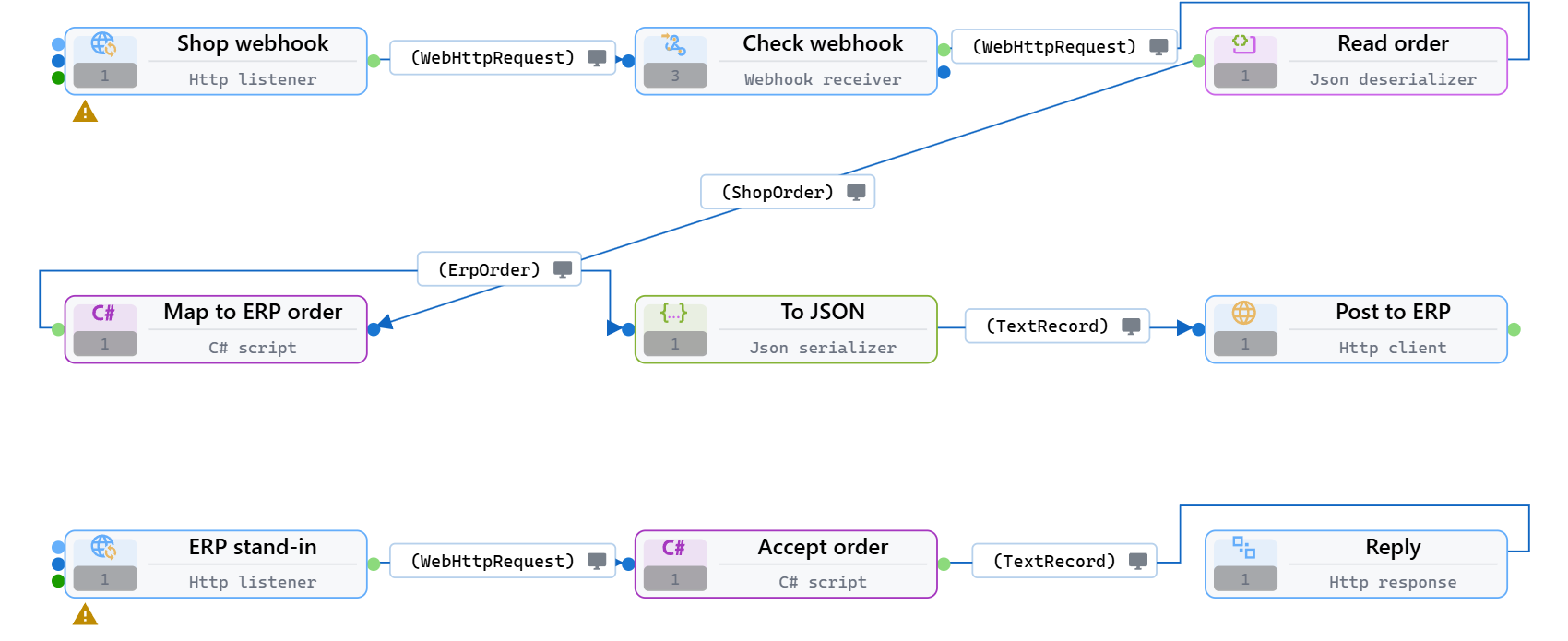
The shop sends this JSON, with a shared secret in the X-Shop-Token header and a unique id in X-Event-Id:
json
{
  "orderNumber": "1001",
  "customer": " Ana Horvat ",
  "total": 149.9,
  "currency": "eur"
}
The ERP wants this:
json
{
  "Reference": "WEB-1001",
  "CustomerName": "Ana Horvat",
  "Amount": 149.9,
  "Currency": "EUR",
  "Channel": "web shop"
}
1. Create the flow and its types
Create a flow and name it Order webhook (see Your first flow).
Open the type editor from the Data type of any connection, or with New type, and create the two types:
- ShopOrder: open Import, choose From JSON sample, paste the shop's JSON above and click Import. Rename the new type to
ShopOrder. Its fields areOrderNumber,Customer,TotalandCurrency, each with the JSON name as its Serialization name, soorderNumberin the JSON fillsOrderNumber. - ErpOrder: create it by hand with the fields
Reference,CustomerName,CurrencyandChannelasString, andAmountasDecimal.
See Build types and Import types for the type editor.
2. Receive the call
Place an Http listener and name it Shop webhook. Set:
| Property | Value |
|---|---|
| Listen url | http://localhost:9100/shop/orders |
| Keep raw body | on, so the next component can check the exact bytes the shop sent |
Connect its Output pin to a Webhook receiver and name it Check webhook. Set:
| Property | Value |
|---|---|
| Signature scheme | SharedSecretHeader |
| Secret | the secret you agreed with the shop |
| Signature header | X-Shop-Token |
| Event id header | X-Event-Id |
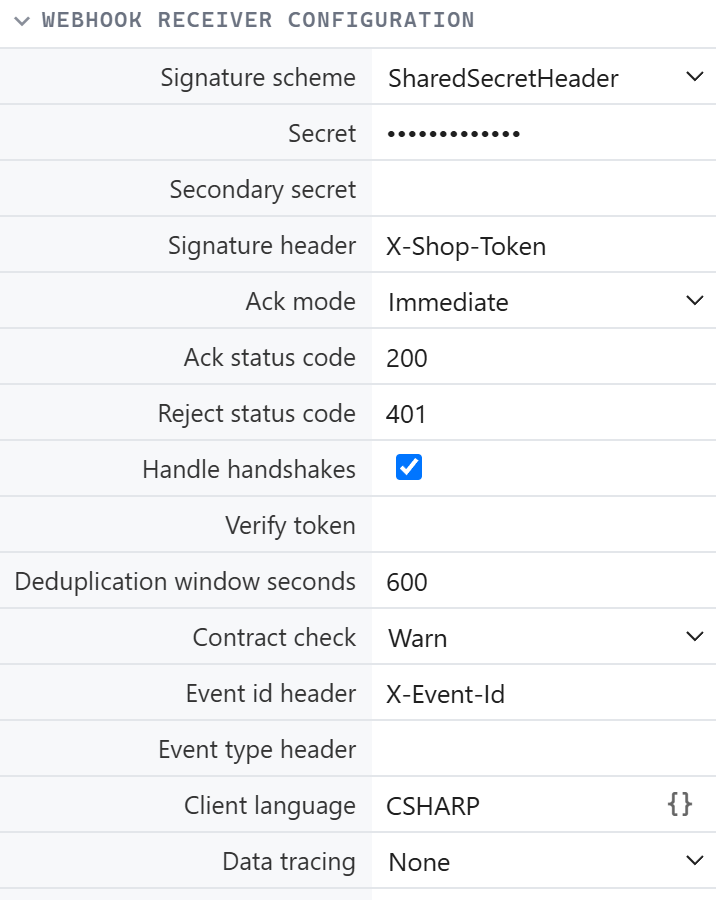
The receiver answers the shop with 200 as soon as the request passes its checks, so the shop never waits for your ERP. It rejects a wrong token with 401, and it drops an order the shop sends again with the same event id within ten minutes (Deduplication window seconds).
Keep the secret out of the flow
Put the secret in an expression setting and enter its name, such as =Shop.WebhookSecret, in Secret. The secret then stays out of the flow and its history.
3. Read the order
Connect the receiver's Output pin to a Json deserializer named Read order. It turns the JSON into a record of the type on its outgoing connection, which you set to ShopOrder in the next step.
4. Turn it into the ERP's order
Connect Read order to a C# script named Map to ERP order, and connect the script's Output pin to a Json serializer named To JSON. Set the type of the connection into the script to ShopOrder and the type of the connection out of it to ErpOrder.
Open the script and replace the template with:
csharp
// Turns the shop's order into the order the ERP expects.
public override void Execute(IMetaData metaDataInstance, IViaType inputDataInstance)
{
    var metaData = (viauser.FlowMetaData)metaDataInstance;
    var input = (ShopOrder)inputDataInstance;
    var output = new ErpOrder
    {
        Reference = "WEB-" + input.OrderNumber,
        CustomerName = input.Customer?.Trim(),
        Amount = Math.Round(input.Total ?? 0, 2),
        Currency = (input.Currency ?? "EUR").ToUpperInvariant(),
        Channel = "web shop",
    };
    Services.Log.Information($"Order {input.OrderNumber} mapped to {output.Reference}");
    Next(metaData, output);
}
Total is a nullable Decimal because the import made it one; ?? 0 handles an order without a total. Mapping that needs no code can also be done with the Data mapper.
5. Post it to the ERP
Set Indented off on To JSON for compact JSON, and connect it to an Http client named Post to ERP:
| Property | Value |
|---|---|
| Method | POST |
| Uri | your ERP's order endpoint; http://localhost:9101/erp/orders for the stand-in below |
| Content type | application/json |
The Http client sends the JSON as the request body. A failed call (no answer, or a status other than 2xx) is retried for network errors and 503, then raised as an error that a Try catch around the call can handle.
A stand-in for the ERP
No ERP to test against yet? Add a second Http listener to the same flow with Listen urlhttp://localhost:9101/erp/orders, a C# script after it, and an Http response after the script. Set the type of the connection into the Http response to TextRecord, and use this script:
csharp
// Stand-in for the ERP: accepts every order and answers with its reference.
public override void Execute(IMetaData metaDataInstance, IViaType inputDataInstance)
{
    var metaData = (viauser.FlowMetaData)metaDataInstance;
    var request = (WebHttpRequest)inputDataInstance;
    Services.Log.Information($"ERP received {request.Body}");
    Next(metaData, new TextRecord { Value = "{\"accepted\":true}", ContentType = "application/json" });
}
Point Uri at your real ERP when it is ready, and delete the stand-in.
6. Run it and send an order
Press F5. The flow starts both listeners and waits. Send the shop's call from a terminal:
bash
curl -i -X POST http://localhost:9100/shop/orders \
  -H "Content-Type: application/json" \
  -H "X-Shop-Token: <your secret>" \
  -H "X-Event-Id: evt-1001" \
  -d '{"orderNumber": "1001", "customer": " Ana Horvat ", "total": 149.9, "currency": "eur"}'
The answer is HTTP/1.1 200 OK. The flow log shows Order 1001 mapped to WEB-1001, then the stand-in's ERP received {"Reference":"WEB-1001","CustomerName":"Ana Horvat","Amount":149.9,"Currency":"EUR","Channel":"web shop"}.
7. Look inside
Click the screen icon on the ErpOrder connection to open the data monitor, and send the order again with a new event id. The monitor shows each record that passed:
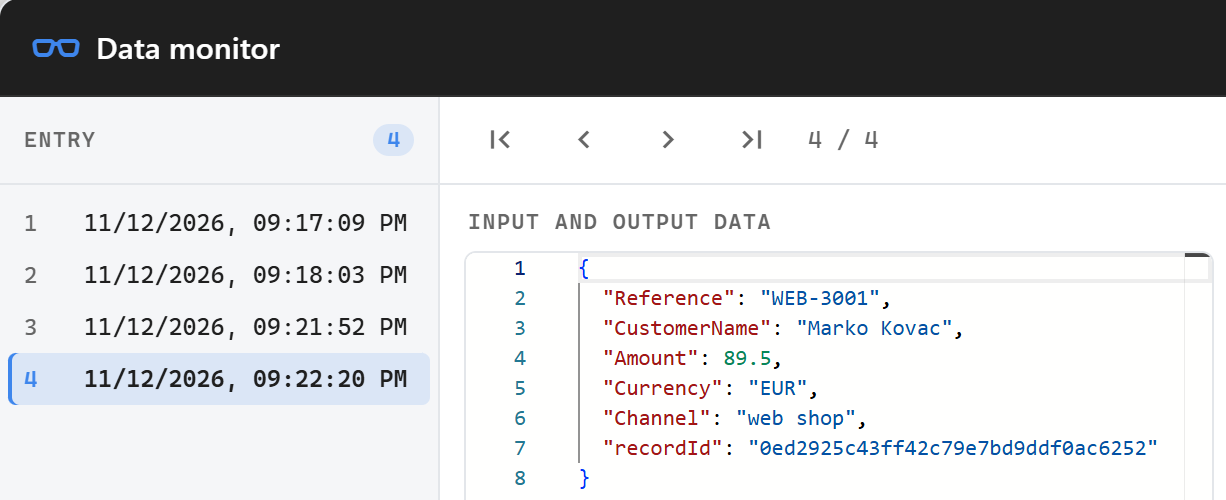
Now send the same event id twice, and once with a wrong token. The trace console shows the duplicate being dropped and the wrong token being rejected; the shop got 200 for the duplicate and 401 for the wrong token:

Stop the flow with Shift+F5 when you are done.
Next steps
- Let the shop retry when the ERP is down: set Ack mode to
AfterFlowon the receiver and answer with an Http response at the end of the flow. See the Webhook receiver. - Give the shop a ready-made client for your webhook with Connect an app.
- Make the URL public: change Listen url to
http://0.0.0.0:9100/shop/orders. - Handle failures of the ERP call with Try catch and Retry: see the flow plugins.